
How Do I Publish an App on the App Store as a Company vs Individual?


28 October, 2026
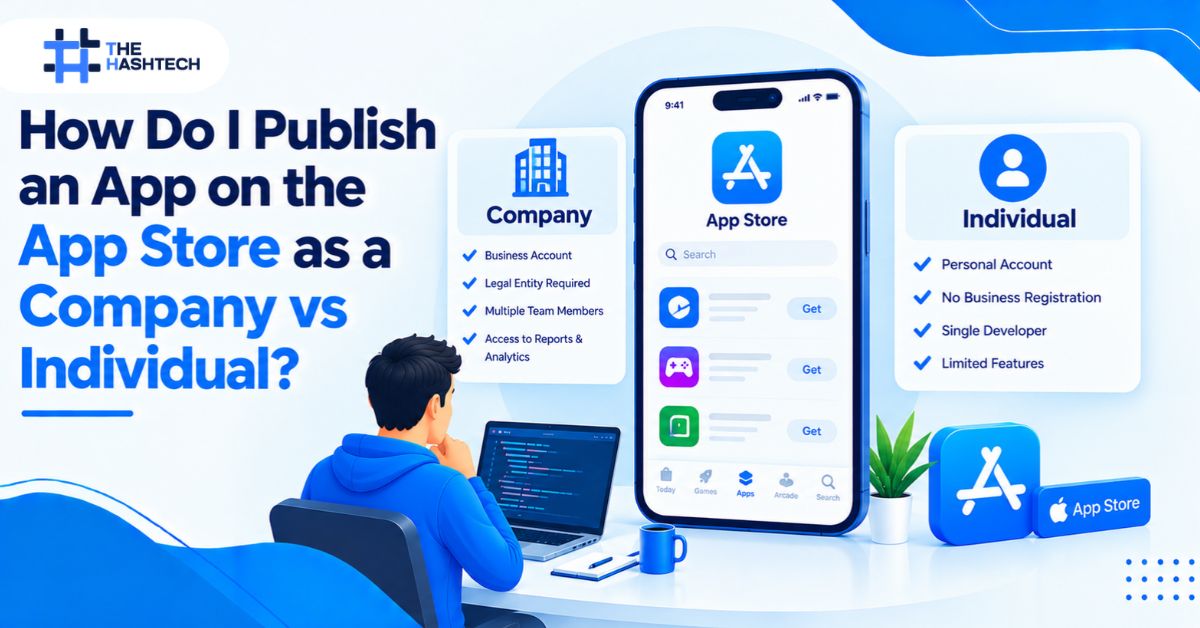
To publish an app on the App Store, enroll in the Apple Developer Program as either an individual or an organization. An individual uses a personal legal name. A company needs a legal entity name, a D-U-N-S Number, and a person with authority to bind the company. Both pay USD 99 per year. Then you create the app in App Store Connect, prepare the build and listing, and submit it for review. Android apps go through Google Play instead, with different rules.
This guide compares the two account types, walks through the full iOS setup, lists every detail your listing needs, and explains how to publish an Android app too.
Company vs Individual: Quick Comparison
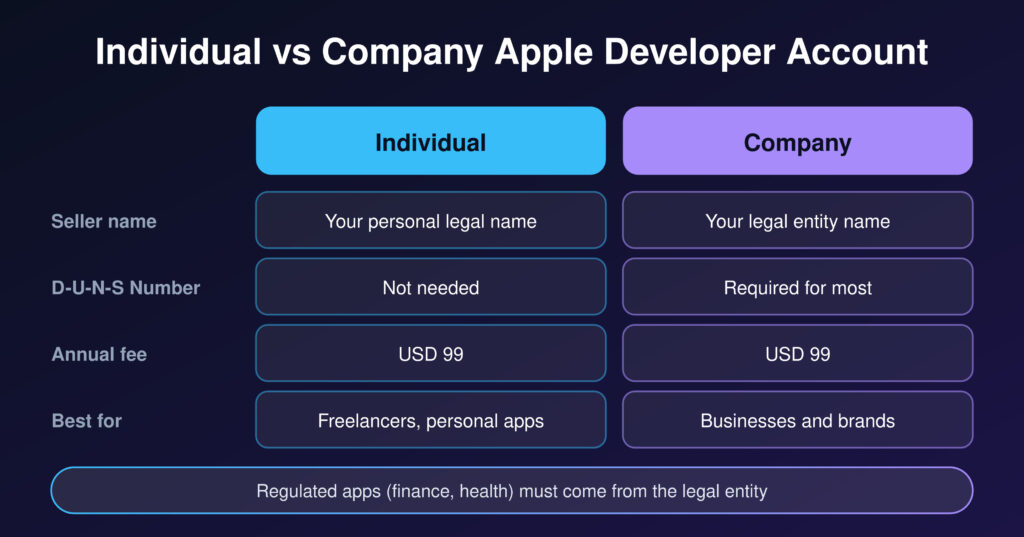
| Individual account | Company (organization) account | |
| Seller name on the App Store | Your personal legal name | Your company’s legal entity name |
| Who it suits | Freelancers, sole proprietors, personal projects | Businesses, brands, agencies’ clients, funded startups |
| D-U-N-S Number | Not needed | Required for most organizations |
| Annual fee | USD 99 | USD 99 |
| Legal authority needed | Your own | Authority to bind the company |
| Regulated apps (finance, health) | Not suitable | Required to come from the legal entity |
| Can you convert later? | Yes, by contacting Apple Developer Support | Already an organization |
Apple Developer Account as an Individual
An individual account is the simplest route. You need an Apple Account with two-factor authentication turned on, and you must be of legal age in your region. Apple lists your personal name as the seller.
Choose this route if you are a freelancer, a sole proprietor, or you are building a personal or hobby app. Apple tells sole proprietors to enroll as individuals.
The trade-off is visibility and trust. Customers see your personal name, not a company brand. And Apple expects some apps to come from a business, not a person.
Apple Developer Account as a Company
A company account lists your legal entity name as the seller. Apple verifies the entity before it approves you.
You need:
- Legal entity status. Your organization must be able to enter contracts with Apple.
- A D-U-N-S Number. Apple uses it to verify identity, legal status, and address.
- Legally binding authority. The person who enrolls becomes the Account Holder. If that person is not the owner, Apple asks for a reference who can confirm their authority.
- A company website and company email. These support verification.
- A reachable phone number. Apple may call the number on your D-U-N-S record.
Apple does not accept DBAs, trade names, or branches. Use the exact legal entity name. If your D-U-N-S listing is missing or wrong, email Dun & Bradstreet with your business registration documents.
Saudi companies should keep their commercial registration documents ready. Our mobile app development company in Saudi Arabia team often helps clients match legal names across their documents before enrollment.
Which Account Should You Choose?
Use this simple test.
- Choose individual if you are one person, the app is personal, and no regulator or partner needs a company seller.
- Choose company if you build for a business, want your brand shown as the seller, need team access, or work in banking, healthcare, or another regulated field.
Apple requires apps in highly regulated fields to come from the legal entity that provides the service. For trading, investing, or money management, the financial institution must submit the app and hold the right licenses for each region.
Avoid one common mistake: publishing a client’s app under your own personal or agency account. The client should own the account. Apple allows app transfers, but ownership disputes are painful to fix later.
Step by Step: Publish an App on the App Store
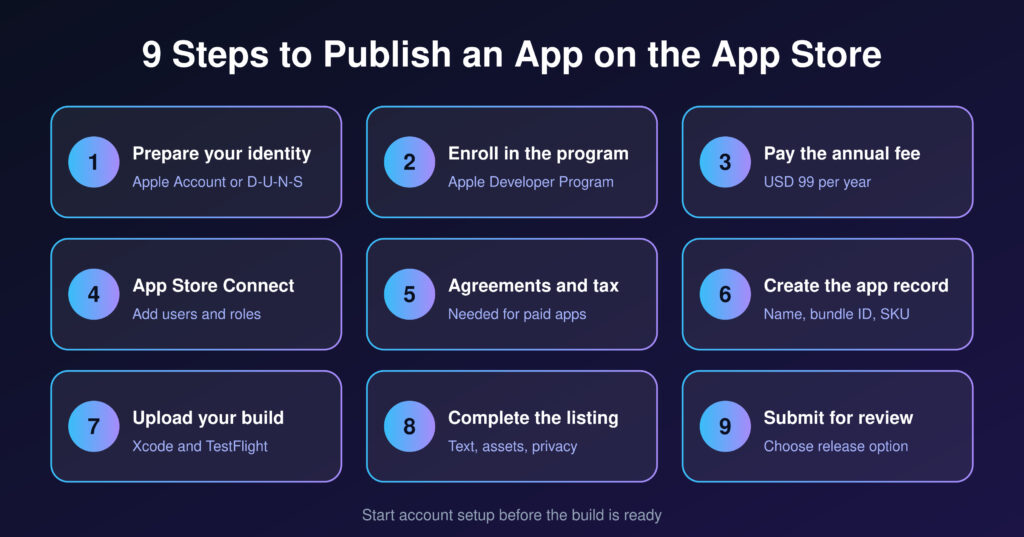
Follow this order, whichever account you choose.
- Prepare your identity. Individuals prepare a personal Apple Account. Companies check the D-U-N-S Number and legal entity name first.
- Enroll in the Apple Developer Program. Use the Apple Developer app or the web. Apple may verify your identity through the app, which requires an iPhone, iPad, or Mac.
- Pay the annual fee. It is USD 99, shown in local currency where available.
- Set up App Store Connect. Add users and roles. Keep the Account Holder as the owner.
- Handle agreements, tax, and banking. You need this only if you sell paid apps or in-app purchases.
- Create the app record. Add the name, bundle ID, primary language, and SKU.
- Upload your build. Archive the app in Xcode and upload it. Test it through TestFlight.
- Complete the listing. Add every field described in the next section.
- Submit for review. Choose your release option and send the app to App Review.
Our iOS app development team follows this same order on client projects, so the account is ready before the build is.
Full Details Your iOS App Needs Before Submission
Most rejections and delays come from missing details. Prepare all of these before you submit.
Build and Technical Details
- A release build archived in Xcode, with a unique bundle ID and version number
- Correct signing and provisioning for distribution
- A privacy manifest, since Apple requires one
- Clear permission messages for camera, location, and any other access
- Answers to the export compliance questions about encryption
- A stable build tested on real devices through TestFlight
Listing Text Fields
| Field | Limit | Notes |
| App name | 30 characters | Highest search weight |
| Subtitle | 30 characters | Short promise under the name |
| Keywords | 100 characters | Hidden, comma-separated, no spaces |
| Promotional text | 170 characters | Editable without a new version |
| Description | 4,000 characters | Write for conversion, not search |
| What’s New | 4,000 characters | Needed for every update |
| Support URL | Required | Link to real support contact |
| Privacy policy URL | Required | Public, working link |
Visual Assets
- App icon: 1024 × 1024 PNG with no transparency and no rounded corners. Apple adds those.
- Screenshots: up to 10 per language. App Store Connect shows the current required device sizes.
- App previews: up to 3 videos, optional but useful.
- iPad screenshots: add them if your app supports iPad.
Privacy and Legal Details
- A privacy policy link inside the app and in App Store Connect
- Accurate App Privacy answers that match every SDK you use
- In-app account deletion if users can create an account
- An age rating, based on Apple’s questionnaire
- A category and copyright line
App Review Information
- A working demo account if the app needs a login
- Contact details for the person who can answer Apple quickly
- Review notes that explain unusual features
- Live backend services during the entire review
Pricing and Availability
- Free or paid pricing, and any in-app purchases
- Countries where the app is available
- Release choice: automatic, manual, or scheduled
Agreements, Tax, and Banking
Apple treats free and paid apps differently. The Free Apps agreement is active by default. To sell paid apps or in-app purchases, the Account Holder must sign the Paid Apps Agreement.
After signing, you complete tax forms and add banking details. Every developer must complete a US tax form. Companies outside the United States are usually guided to a W-8BEN-E, and Apple’s tool selects the right form from your answers. Apple pays into one bank account on file, so a dedicated business account is best.
Free apps skip this step. Set it up early if you may add subscriptions later.
How to Publish an Android App on Google Play
Android apps do not go on the App Store. They go on Google Play. The process is similar, but the account rules differ. Our Android app development team handles this process for clients every week.
Google Play Account: Personal vs. Organization
| Personal account | Organization account | |
| One-time fee | USD 25 | USD 25 |
| Verification | Government ID | D-U-N-S Number and business verification |
| Closed testing rule | 12 testers for 14 continuous days (accounts created after 13 November 2023) | Exempt |
| Best for | Individuals and hobby apps | Businesses and teams |
Google charges a one-time USD 25 fee, with no yearly renewal. The key difference is testing. A personal account created after 13 November 2023 must run a closed test with at least 12 testers opted in for 14 continuous days before it can apply for production access. Organization accounts skip that rule. You cannot simply switch a personal account to an organization account later. You create a new organization account and transfer the apps.
Steps to Publish on Google Play
- Create your Play Console account. Choose personal or organization, pay the fee, and verify your identity.
- Create the app. Add the app name, default language, and whether it is free or paid.
- Build a signed Android App Bundle (.aab). Google Play requires bundles, not APKs, for new apps. Turn on Play App Signing.
- Meet the target API requirement. Google raises the minimum target level over time, so check the current requirement in Play Console.
- Complete the store listing. Add the title, a short description of up to 80 characters, and a full description of up to 4,000 characters.
- Upload graphics. You need a 512 × 512 icon, a 1024 × 500 feature graphic, and at least 2 phone screenshots.
- Fill in the compliance forms. Complete the Data safety form, the content rating questionnaire, the target audience declaration, and the privacy policy link.
- Test in tracks. Use internal, closed, and open testing. Personal accounts must complete the closed test.
- Release to production. Submit the release. Review can take anywhere from hours to several days.
App Store vs Google Play at a Glance
| Apple App Store | Google Play | |
| Fee | USD 99 per year | USD 25 once |
| Build format | Xcode archive uploaded to App Store Connect | Signed Android App Bundle |
| Company verification | D-U-N-S Number | D-U-N-S Number |
| Special testing rule | None for accounts | 12 testers for 14 days on newer personal accounts |
| Icon | 1024 × 1024, no transparency | 512 × 512 PNG |
| Extra graphic | None required | 1024 × 500 feature graphic |
| Review speed | Apple says 90% of submissions take under 24 hours on average | Hours to several days |
If you build with Flutter or React Native, you can reuse most of the code across both stores. You still prepare separate listings, assets, and compliance forms. Our mobile app development team plans both launches together.
What App Review Checks
Apple says that, on average, 90% of submissions are reviewed in less than 24 hours. Incomplete submissions take longer. Check the details below before you submit.
| Guideline | Typical problem | How to avoid it |
| 2.1 App Completeness | Crashes, blocked access, or an unfinished build | Test the release build and share demo credentials |
| 5.1.1 Data Collection and Storage | Privacy mismatch or missing account deletion | Audit every SDK and add in-app deletion |
| 4.2 Minimum Functionality | Too little lasting functionality | Offer real value beyond a website wrapper |
| 2.3 Accurate Metadata | Listing does not match the app | Update screenshots and text for each release |
| 3.1.1 In-App Purchase | Wrong payment path for digital goods | Use in-app purchase for digital content |
| 4.8 Login Services | Missing an equivalent login option | Review the current login rules before you build |
If Apple rejects your app, read the Resolution Center message, fix only the named issue, reply with clear notes, and resubmit. If you believe the decision is wrong, ask for clarification or appeal.
Notes for Saudi Businesses
Saudi teams should add a few checks.
- Regulated apps. A Saudi fintech should plan for its licensed entity, such as one regulated by SAMA, to be the seller.
- Arabic listing. Write the app name, subtitle, description, and keywords in Arabic, and use real RTL screenshots. A native writer should review them.
- Payments. Digital goods and subscriptions inside the app generally use Apple’s in-app purchase. Physical goods and services that users consume outside the app can use other payment methods like Mada. Check the current guidelines for your case before designing checkout.
- Budget. Store fees are small compared with development and maintenance. See how Arabic localization and platform choices affect pricing in our guide to mobile app development cost in Saudi Arabia.
Plan Your Launch Timeline
Start account setup at least four weeks before your launch date. That is a planning rule, not an Apple or Google promise. It protects you from D-U-N-S, identity, and testing delays. Personal Google Play accounts need extra time for the 14-day closed test.
Build the accounts in parallel with development. For city-level budgeting examples, see our guide to app development cost in Jeddah.
Final Thoughts
To publish an app on the App Store, decide the account type first. An individual account is fast and simple. A company account takes more preparation but gives you your brand name, team access, and a clean ownership record. For client or business apps, choose the company route.
Then prepare the details Apple and Google ask for: build, listing, assets, privacy answers, review notes, and agreements. Teams that gather these before submission ship faster and see fewer rejections.
Frequently Asked Questions
What is the difference between a company and an individual Apple Developer account?
An individual account shows your personal name as the seller. A company account shows your legal entity name and needs a D-U-N-S Number and legal binding authority. Both cost USD 99 per year.
Can I publish an app on the App Store as an individual?
Yes. Individuals can enroll with an Apple Account that has two-factor authentication. Your personal legal name appears as the seller. Some regulated apps must come from a company instead.
Do I need a D-U-N-S Number to publish an app on the App Store?
Organizations need one in most cases. Individuals do not. Apple uses the D-U-N-S Number to verify a company’s identity, legal status, and address.
Can I convert an individual account to a company account?
Yes. Contact Apple Developer Support and meet the organization requirements. It is easier to enroll the first time correctly.
How do I publish an Android app?
Android apps go on Google Play. Create a Play Console account for a one-time USD 25 fee, upload a signed Android App Bundle, complete the store listing and compliance forms, test, and release. New personal accounts must first run a 12-tester, 14-day closed test.
Do I need an iPhone or Mac to publish an iOS app?
You need a Mac to build and archive iOS apps with Xcode. Apple may also use an Apple device for identity verification during enrollment.
How long does App Store review take?
Apple says that, on average, 90% of submissions are reviewed in less than 24 hours. Incomplete or complex submissions can take longer.
Can a Saudi company publish apps on both stores?
Yes. A Saudi company can enroll in both programs as an organization. Prepare the legal entity name, D-U-N-S Number, and commercial registration documents before you start.
Need Help Launching on Both Stores?
We set up developer accounts, prepare listings, and manage submissions for iOS and Android. Talk to our team, and we will plan your launch from account setup to approval.